WE TRANSFORM EXISTING MEDICAL EQUIPMENT WITH ADVANCED CONNECTIVITY AND ARTIFICIAL INTELLIGENCE CAPABILITIES
HOW TO CONNECT THE THERMOSCAN PRO 6000 TO THE CLOUD AND AI: THE COMPLETE PROFESSIONAL GUIDE
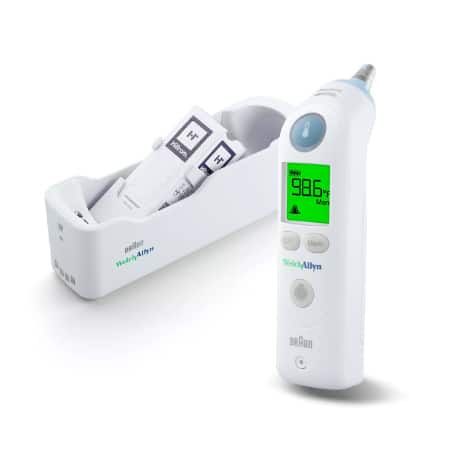
Introduction: Transforming Traditional Medical Devices into Smart Healthcare Solutions
In the rapidly evolving landscape of digital healthcare, the integration of traditional medical devices with cloud computing and artificial intelligence represents one of the most significant technological advances of our time. The Braun ThermoScan Pro 6000, a trusted and widely-used ear thermometer in professional medical settings, stands as an exemplary candidate for this digital transformation. This comprehensive guide will walk you through the complete process of connecting this reliable medical device to cloud infrastructure and AI-powered systems, enabling unprecedented capabilities in patient monitoring, data analytics, and predictive healthcare.
The ThermoScan Pro 6000 has established itself as a gold standard in clinical temperature measurement, offering accuracy, reliability, and ease of use. However, in its traditional configuration, each temperature reading remains isolated—recorded manually or stored temporarily in device memory. By connecting this device to the cloud and integrating AI capabilities, healthcare providers can unlock transformative benefits: real-time data synchronization, automated patient record updates, trend analysis, early warning systems for potential health issues, and seamless integration with electronic health record (EHR) systems.
This transformation is not merely about technological advancement; it represents a fundamental shift in how we approach patient care, moving from reactive medicine to proactive, data-driven healthcare that can predict and prevent complications before they become critical.
Understanding the Braun ThermoScan Pro 6000: Technical Foundation
Device Specifications and Capabilities
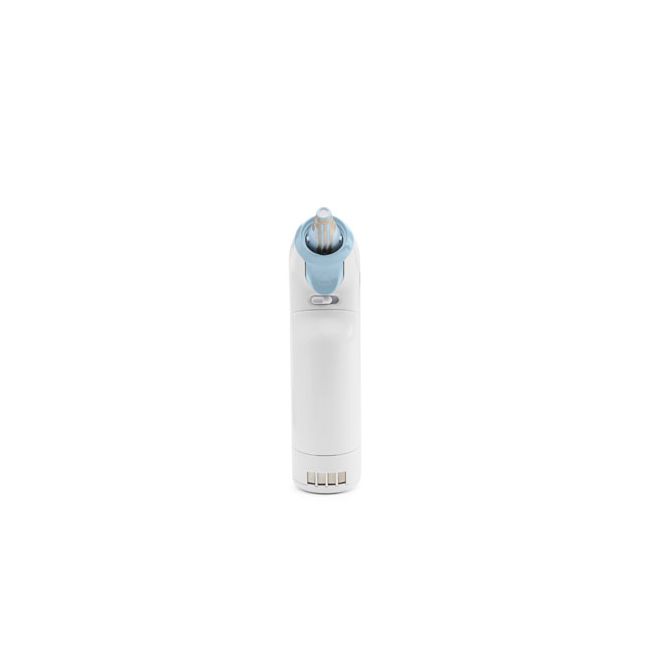
The Braun ThermoScan Pro 6000, manufactured under the Welch Allyn brand, represents the pinnacle of infrared ear thermometry technology. Understanding its technical capabilities is essential before embarking on cloud integration:
Core Technical Specifications:
- Measurement Technology: Infrared tympanic thermometry
- Measurement Range: 34.0°C to 42.2°C (93.2°F to 108.0°F)
- Accuracy: ±0.2°C (±0.4°F) in the range 35.5°C to 42.0°C
- Measurement Time: Approximately 1-2 seconds
- Memory Capacity: Stores last temperature reading
- Display: Large LCD with backlight for easy reading
- Power Source: Rechargeable lithium-ion battery
- Cradle Interface: Proprietary charging and data transfer dock
Professional-Grade Features:
- Probe Covers: Disposable lens filters ensure hygiene between patients
- ExacTemp Technology: Audible and visual confirmation when positioned correctly
- Celsius/Fahrenheit Toggle: Adaptable to different regional standards
- Silent Mode: Option for discrete temperature taking
- Robust Construction: Designed for high-volume clinical use
The Connectivity Challenge
The ThermoScan Pro 6000 was originally designed as a standalone device, lacking native wireless connectivity features such as WiFi, Bluetooth, or cellular capabilities. The device communicates with its charging cradle through proprietary contact points that transfer power and, potentially, data. This presents both a challenge and an opportunity:
The Challenge: No built-in network interface means direct internet connectivity is impossible without hardware modification or intermediary solutions.
The Opportunity: The cradle’s data interface provides a legitimate access point for extracting temperature readings without compromising the device’s medical certification or warranty.
This architectural limitation requires us to implement what is known as an “IoT gateway solution”—an intermediary device that bridges the gap between the ThermoScan Pro 6000 and cloud infrastructure.
The Cloud and AI Integration Architecture
Conceptual Framework
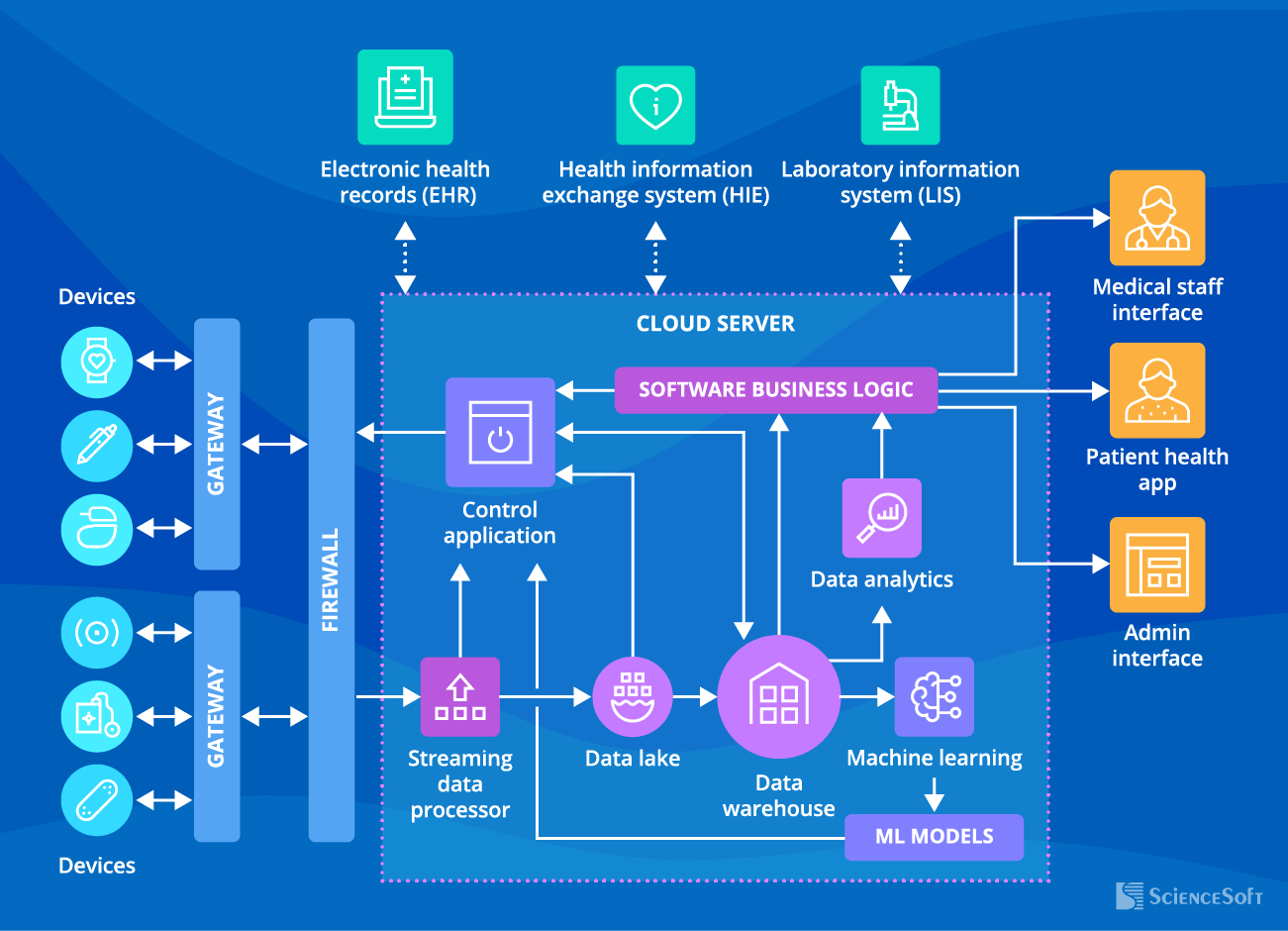
Before diving into implementation details, it’s crucial to understand the overall architecture of a cloud-connected medical device ecosystem. The integration consists of several interconnected layers:
1. Device Layer (Physical)
- The ThermoScan Pro 6000 itself
- Proprietary charging/data cradle
- Interface adapter or gateway hardware
2. Edge Computing Layer
- IoT gateway device
- Local data processing
- Protocol conversion
- Initial data validation
3. Network Layer
- Secure communication protocols (HTTPS, MQTT, WebSocket)
- Encryption mechanisms (TLS/SSL)
- Authentication systems
- Network redundancy
4. Cloud Infrastructure Layer
- Cloud storage (databases)
- Application servers
- API endpoints
- Load balancers
5. AI/Analytics Layer
- Machine learning models
- Predictive analytics engines
- Pattern recognition algorithms
- Anomaly detection systems
6. Application Layer
- Web-based dashboards
- Mobile applications
- EHR integration interfaces
- Alert and notification systems
Each layer serves a specific purpose and must be carefully designed to ensure reliability, security, and compliance with healthcare regulations such as HIPAA (Health Insurance Portability and Accountability Act) in the United States or GDPR (General Data Protection Regulation) in Europe.
Step-by-Step Implementation Guide
Phase 1: Hardware Interface Development

Step 1.1: Cradle Analysis and Reverse Engineering
The first critical step involves understanding how the ThermoScan Pro 6000 communicates with its cradle. This requires:
Physical Examination:
- Identify the contact points on both the thermometer and cradle
- Determine the pinout configuration (power, ground, data lines)
- Measure voltage levels during charging and data transfer
- Document the physical connector specifications
Protocol Investigation:
- Use a logic analyzer to capture communication between device and cradle
- Identify the communication protocol (likely UART, SPI, or I2C)
- Determine baud rate and data format
- Decode the data packets to understand the message structure
Safety Considerations:
- Ensure any modifications maintain electrical isolation for patient safety
- Verify that voltage levels remain within safe ranges
- Implement overcurrent and overvoltage protection
- Consider using optoisolators for electrical safety
Step 1.2: Building the IoT Gateway
Once you understand the communication protocol, the next step is building an IoT gateway that can:
Hardware Components Required:
- Microcontroller or single-board computer (Raspberry Pi, Arduino, ESP32)
- Interface circuitry matching the cradle’s electrical specifications
- WiFi or cellular module for internet connectivity
- Power supply with appropriate voltage regulation
- Enclosure meeting medical device standards
Recommended Platform: Raspberry Pi 4 Configuration
The Raspberry Pi 4 offers an excellent balance of processing power, connectivity options, and development support:
Hardware Setup:
- Raspberry Pi 4 Model B (4GB RAM minimum)
- USB-to-Serial adapter (if cradle uses UART)
- or GPIO pins configured for the appropriate protocol
- WiFi or Ethernet connection for internet access
- SD card (32GB minimum) with Raspberry Pi OS
- 5V 3A power supply
- Custom interface board (PCB designed to match cradle connector)
Step 1.3: Interface Board Design
Creating a custom interface board ensures reliable, safe connection:
Circuit Design Requirements:
- Input protection (TVS diodes, fuses)
- Level shifters (if voltage translation needed)
- Optical isolation for patient safety
- LED indicators for status monitoring
- Test points for debugging
- Proper PCB layout with adequate creepage and clearance
Step 1.4: Firmware Development
The gateway firmware serves as the bridge between the ThermoScan Pro 6000 and the cloud:
# Pseudocode for Gateway Firmware
import serial
import time
import json
import requests
from datetime import datetime

class ThermoScanGateway:
    def __init__(self, serial_port, cloud_endpoint):
        self.serial = serial.Serial(serial_port, baudrate=9600)
        self.cloud_endpoint = cloud_endpoint
        self.device_id = "THERMOSCAN_001"

    def read_temperature(self):
        """Read temperature from ThermoScan Pro 6000"""
        # Wait for data from thermometer
        if self.serial.in_waiting > 0:
            raw_data = self.serial.read(self.serial.in_waiting)
            # Parse the data according to protocol
            temperature = self.parse_temperature(raw_data)
            return temperature
        return None

    def parse_temperature(self, raw_data):
        """Parse raw data into temperature reading"""
        # Implementation depends on actual protocol
        # This is a placeholder
        temp_bytes = raw_data[2:4]  # Example
        temperature = int.from_bytes(temp_bytes, 'big') / 10.0
        return temperature

    def send_to_cloud(self, temperature):
        """Send temperature data to cloud"""
        data = {
            'device_id': self.device_id,
            'timestamp': datetime.utcnow().isoformat(),
            'temperature': temperature,
            'unit': 'celsius',
            'device_type': 'ThermoScan_Pro_6000'
        }

        try:
            response = requests.post(
                self.cloud_endpoint,
                json=data,
                headers={'Content-Type': 'application/json'},
                timeout=10
            )
            return response.status_code == 200
        except Exception as e:
            print(f"Error sending to cloud: {e}")
            return False

    def run(self):
        """Main loop"""
        print("ThermoScan Gateway Started")
        while True:
            temp = self.read_temperature()
            if temp:
                print(f"Temperature reading: {temp}°C")
                if self.send_to_cloud(temp):
                    print("Data sent to cloud successfully")
                else:
                    print("Failed to send data to cloud")
            time.sleep(0.1)

# Initialize and run gateway
gateway = ThermoScanGateway('/dev/ttyUSB0', 'https://api.healthcare.cloud/temperature')
gateway.run()
Phase 2: Cloud Infrastructure Setup

Step 2.1: Choosing a Cloud Platform
Several cloud platforms offer excellent healthcare-focused infrastructure:
Amazon Web Services (AWS):
- AWS IoT Core: Managed IoT service for device connectivity
- Amazon HealthLake: HIPAA-eligible data storage
- AWS Lambda: Serverless computing for data processing
- Amazon SageMaker: AI/ML model development and deployment
- Advantages: Comprehensive healthcare compliance, extensive documentation
- Considerations: Cost can escalate with high data volumes
Microsoft Azure:
- Azure IoT Hub: Device connectivity and management
- Azure Health Data Services: FHIR-compliant data storage
- Azure Functions: Event-driven serverless compute
- Azure Machine Learning: Enterprise ML platform
- Advantages: Strong enterprise integration, excellent healthcare partnerships
- Considerations: Learning curve for Azure-specific services
Google Cloud Platform (GCP):
- Cloud IoT Core: (Note: Being deprecated, alternative paths needed)
- Cloud Healthcare API: HIPAA-compliant healthcare data management
- Cloud Functions: Serverless execution environment
- Vertex AI: Unified ML platform
- Advantages: Superior AI/ML capabilities, competitive pricing
- Considerations: IoT Core deprecation requires alternative connectivity solutions
Step 2.2: Setting Up AWS IoT Core (Detailed Example)
Let’s walk through a complete AWS setup:
2.2.1: Create an IoT Thing
# Using AWS CLI
aws iot create-thing --thing-name ThermoScan_Pro_6000_001

# Generate certificates
aws iot create-keys-and-certificate \
    --set-as-active \
    --certificate-pem-outfile thermoscan_cert.pem \
    --public-key-outfile thermoscan_public.key \
    --private-key-outfile thermoscan_private.key
2.2.2: Create and Attach IoT Policy
{
  "Version": "2012-10-17",
  "Statement": [
    {
      "Effect": "Allow",
      "Action": [
        "iot:Connect"
      ],
      "Resource": [
        "arn:aws:iot:us-east-1:ACCOUNT_ID:client/ThermoScan_Pro_6000_001"
      ]
    },
    {
      "Effect": "Allow",
      "Action": [
        "iot:Publish"
      ],
      "Resource": [
        "arn:aws:iot:us-east-1:ACCOUNT_ID:topic/thermoscan/temperature"
      ]
    }
  ]
}
2.2.3: Configure IoT Rules for Data Processing
{
  "sql": "SELECT device_id, timestamp, temperature, unit FROM 'thermoscan/temperature'",
  "actions": [
    {
      "dynamodb": {
        "tableName": "TemperatureReadings",
        "roleArn": "arn:aws:iam::ACCOUNT_ID:role/IoTDynamoDBRole",
        "hashKeyField": "device_id",
        "hashKeyValue": "${device_id}",
        "rangeKeyField": "timestamp",
        "rangeKeyValue": "${timestamp}",
        "payloadField": "payload"
      }
    },
    {
      "lambda": {
        "functionArn": "arn:aws:lambda:us-east-1:ACCOUNT_ID:function:ProcessTemperature"
      }
    }
  ]
}
Step 2.3: Database Design
Proper database schema is crucial for efficient data storage and retrieval:
DynamoDB Table Schema (NoSQL Approach):
Table: TemperatureReadings
Primary Key:
  - Partition Key: device_id (String)
  - Sort Key: timestamp (String, ISO 8601 format)

Attributes:
  - temperature (Number)
  - unit (String)
  - patient_id (String) [optional, if device-patient mapping exists]
  - location (String) [clinic/hospital location]
  - operator_id (String) [healthcare professional who took reading]
  - flags (List) [any anomalies or special conditions]

Global Secondary Indexes:
  - patient_id-timestamp-index (for patient-centric queries)
  - location-timestamp-index (for location-based analytics)
Relational Database Alternative (PostgreSQL):
CREATE TABLE devices (
    device_id VARCHAR(50) PRIMARY KEY,
    device_model VARCHAR(100),
    serial_number VARCHAR(100),
    location VARCHAR(200),
    last_calibration TIMESTAMP,
    status VARCHAR(20)
);

CREATE TABLE temperature_readings (
    reading_id SERIAL PRIMARY KEY,
    device_id VARCHAR(50) REFERENCES devices(device_id),
    timestamp TIMESTAMP NOT NULL,
    temperature NUMERIC(4,2) NOT NULL,
    unit VARCHAR(10) NOT NULL,
    patient_id VARCHAR(50),
    operator_id VARCHAR(50),
    quality_indicator VARCHAR(20),
    notes TEXT,
    INDEX idx_device_timestamp (device_id, timestamp),
    INDEX idx_patient_timestamp (patient_id, timestamp)
);

CREATE TABLE patients (
    patient_id VARCHAR(50) PRIMARY KEY,
    first_name VARCHAR(100),
    last_name VARCHAR(100),
    date_of_birth DATE,
    medical_record_number VARCHAR(50)
);
Phase 3: Implementing AI-Powered Analytics
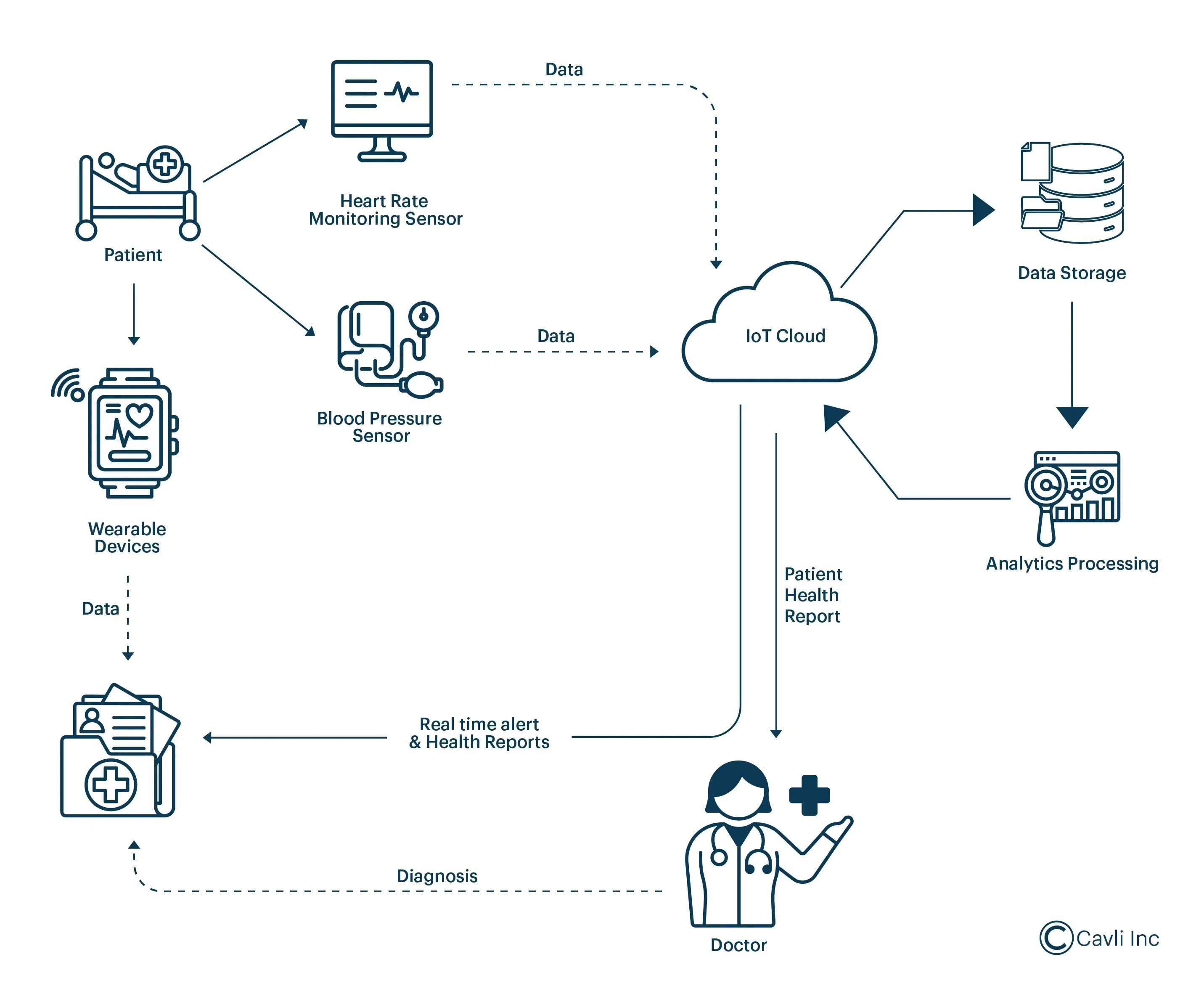
Step 3.1: Data Preparation and Feature Engineering
AI models require carefully prepared data:
Data Preprocessing Pipeline:
import pandas as pd
import numpy as np
from datetime import datetime, timedelta
from sklearn.preprocessing import StandardScaler

class TemperatureDataPreprocessor:
    def __init__(self):
        self.scaler = StandardScaler()

    def load_data(self, start_date, end_date):
        """Load temperature data from database"""
        # Query database for temperature readings
        query = """
            SELECT
                device_id,
                timestamp,
                temperature,
                patient_id,
                operator_id
            FROM temperature_readings
            WHERE timestamp BETWEEN %s AND %s
            ORDER BY timestamp
        """
        # Execute query and return DataFrame
        df = pd.read_sql(query, connection, params=[start_date, end_date])
        return df

    def engineer_features(self, df):
        """Create features for ML models"""
        # Convert timestamp to datetime
        df['timestamp'] = pd.to_datetime(df['timestamp'])

        # Extract time-based features
        df['hour_of_day'] = df['timestamp'].dt.hour
        df['day_of_week'] = df['timestamp'].dt.dayofweek
        df['is_weekend'] = df['day_of_week'].isin([5, 6]).astype(int)

        # Patient-specific features (if patient_id available)
        df_patient = df.groupby('patient_id').agg({
            'temperature': ['mean', 'std', 'min', 'max', 'count']
        }).reset_index()
        df_patient.columns = ['patient_id', 'temp_mean', 'temp_std',
                             'temp_min', 'temp_max', 'reading_count']

        df = df.merge(df_patient, on='patient_id', how='left')

        # Calculate temperature trend (change from previous reading)
        df = df.sort_values(['patient_id', 'timestamp'])
        df['temp_change'] = df.groupby('patient_id')['temperature'].diff()
        df['temp_change_rate'] = df['temp_change'] / df.groupby('patient_id')['timestamp'].diff().dt.total_seconds()

        # Flag abnormal temperatures
        df['is_fever'] = (df['temperature'] >= 38.0).astype(int)
        df['is_hypothermia'] = (df['temperature'] <= 35.0).astype(int)

        return df

    def prepare_for_training(self, df, target_column):
        """Prepare data for ML model training"""
        feature_columns = [
            'temperature', 'hour_of_day', 'day_of_week', 'is_weekend',
            'temp_mean', 'temp_std', 'temp_change', 'temp_change_rate'
        ]

        X = df[feature_columns].fillna(0)
        y = df[target_column]

        X_scaled = self.scaler.fit_transform(X)

        return X_scaled, y
Step 3.2: Building Predictive Models
Several AI models can enhance the ThermoScan Pro 6000’s capabilities:
Model 1: Fever Prediction Model
Predicts likelihood of fever development in the next 24 hours based on temperature trends:
from sklearn.ensemble import RandomForestClassifier, GradientBoostingClassifier
from sklearn.model_selection import train_test_split, cross_val_score
from sklearn.metrics import classification_report, roc_auc_score
import joblib

class FeverPredictionModel:
    def __init__(self):
        self.model = GradientBoostingClassifier(
            n_estimators=100,
            learning_rate=0.1,
            max_depth=5,
            random_state=42
        )

    def train(self, X, y):
        """Train the fever prediction model"""
        X_train, X_test, y_train, y_test = train_test_split(
            X, y, test_size=0.2, random_state=42, stratify=y
        )

        # Train model
        self.model.fit(X_train, y_train)

        # Evaluate
        y_pred = self.model.predict(X_test)
        y_pred_proba = self.model.predict_proba(X_test)[:, 1]

        print("Classification Report:")
        print(classification_report(y_test, y_pred))
        print(f"ROC-AUC Score: {roc_auc_score(y_test, y_pred_proba):.4f}")

        # Cross-validation
        cv_scores = cross_val_score(self.model, X, y, cv=5, scoring='roc_auc')
        print(f"Cross-validation ROC-AUC: {cv_scores.mean():.4f} (+/- {cv_scores.std():.4f})")

        return self.model

    def predict(self, X):
        """Predict fever probability"""
        probabilities = self.model.predict_proba(X)[:, 1]
        return probabilities

    def get_feature_importance(self):
        """Return feature importance for interpretability"""
        return self.model.feature_importances_

    def save_model(self, filepath):
        """Save trained model"""
        joblib.dump(self.model, filepath)

    @classmethod
    def load_model(cls, filepath):
        """Load trained model"""
        instance = cls()
        instance.model = joblib.load(filepath)
        return instance
Model 2: Anomaly Detection System
Identifies unusual temperature patterns that may indicate device malfunction or critical health events:
from sklearn.ensemble import IsolationForest
from sklearn.covariance import EllipticEnvelope
import numpy as np

class TemperatureAnomalyDetector:
    def __init__(self, contamination=0.1):
        self.isolation_forest = IsolationForest(
            contamination=contamination,
            random_state=42,
            n_estimators=100
        )
        self.elliptic_envelope = EllipticEnvelope(
            contamination=contamination,
            random_state=42
        )

    def train(self, X):
        """Train anomaly detection models"""
        self.isolation_forest.fit(X)
        self.elliptic_envelope.fit(X)

    def detect_anomalies(self, X):
        """Detect anomalies using ensemble approach"""
        # Predictions from both models (-1 = anomaly, 1 = normal)
        if_predictions = self.isolation_forest.predict(X)
        ee_predictions = self.elliptic_envelope.predict(X)

        # Anomaly scores
        if_scores = self.isolation_forest.score_samples(X)

        # Consensus: flag as anomaly if both models agree
        consensus_anomalies = (if_predictions == -1) & (ee_predictions == -1)

        return {
            'is_anomaly': consensus_anomalies,
            'anomaly_score': if_scores,
            'isolation_forest_prediction': if_predictions,
            'elliptic_envelope_prediction': ee_predictions
        }

    def get_anomaly_details(self, X, indices):
        """Get detailed information about specific anomalies"""
        anomaly_data = X[indices]
        scores = self.isolation_forest.score_samples(anomaly_data)

        return pd.DataFrame({
            'anomaly_score': scores,
            'severity': np.where(scores < -0.5, 'High',
                        np.where(scores < -0.3, 'Medium', 'Low'))
        })
Model 3: Patient Health Trajectory Prediction
Uses time series analysis to predict patient temperature trajectories:
from tensorflow.keras.models import Sequential
from tensorflow.keras.layers import LSTM, Dense, Dropout
from tensorflow.keras.optimizers import Adam
import numpy as np

class TemperatureTrajectoryPredictor:
    def __init__(self, sequence_length=24):
        self.sequence_length = sequence_length
        self.model = None

    def create_sequences(self, data, target):
        """Create sequences for LSTM input"""
        X, y = [], []
        for i in range(len(data) - self.sequence_length):
            X.append(data[i:i + self.sequence_length])
            y.append(target[i + self.sequence_length])
        return np.array(X), np.array(y)

    def build_model(self, input_shape):
        """Build LSTM model for temperature prediction"""
        model = Sequential([
            LSTM(64, return_sequences=True, input_shape=input_shape),
            Dropout(0.2),
            LSTM(32, return_sequences=False),
            Dropout(0.2),
            Dense(16, activation='relu'),
            Dense(1, activation='linear')
        ])

        model.compile(
            optimizer=Adam(learning_rate=0.001),
            loss='mse',
            metrics=['mae']
        )

        self.model = model
        return model

    def train(self, X, y, epochs=50, batch_size=32, validation_split=0.2):
        """Train the LSTM model"""
        history = self.model.fit(
            X, y,
            epochs=epochs,
            batch_size=batch_size,
            validation_split=validation_split,
            verbose=1
        )
        return history

    def predict(self, X, steps_ahead=6):
        """Predict future temperature readings"""
        predictions = []
        current_sequence = X.copy()

        for _ in range(steps_ahead):
            pred = self.model.predict(current_sequence.reshape(1, -1, current_sequence.shape[-1]))
            predictions.append(pred[0, 0])

            # Update sequence for next prediction
            current_sequence = np.roll(current_sequence, -1, axis=0)
            current_sequence[-1] = pred

        return np.array(predictions)
Phase 4: Building the User Interface and Dashboard
Step 4.1: Web Dashboard Design
A professional dashboard provides healthcare workers with actionable insights:
Dashboard Components:
-
Real-Time Temperature Monitor
- Live feed of temperature readings
- Device status indicators
- Last reading timestamp
- Battery level and calibration status
-
Patient Temperature Trends
- Line charts showing temperature over time
- Normal range indicators
- Fever and hypothermia thresholds
- Comparative analysis with patient baseline
-
AI Insights Panel
- Fever risk predictions
- Anomaly alerts
- Recommended actions
- Confidence scores
-
Alert Management
- Critical temperature alerts
- Device malfunction warnings
- Maintenance notifications
- Calibration reminders
-
Analytics and Reports
- Summary statistics
- Patient population trends
- Device utilization metrics
- Compliance tracking
Step 4.2: Frontend Implementation (React Example)
import React, { useState, useEffect } from 'react';
import { LineChart, Line, XAxis, YAxis, CartesianGrid, Tooltip, Legend } from 'recharts';
import axios from 'axios';

const ThermoScanDashboard = () => {
  const [temperatureData, setTemperatureData] = useState([]);
  const [currentReading, setCurrentReading] = useState(null);
  const [aiPrediction, setAiPrediction] = useState(null);
  const [alerts, setAlerts] = useState([]);

  useEffect(() => {
    // Fetch real-time data
    const fetchData = async () => {
      try {
        const response = await axios.get('https://api.healthcare.cloud/temperature/live');
        setTemperatureData(response.data.history);
        setCurrentReading(response.data.current);
        setAiPrediction(response.data.ai_prediction);
      } catch (error) {
        console.error('Error fetching data:', error);
      }
    };

    // Initial fetch
    fetchData();

    // Set up real-time updates via WebSocket
    const ws = new WebSocket('wss://api.healthcare.cloud/ws/temperature');

    ws.onmessage = (event) => {
      const data = JSON.parse(event.data);

      if (data.type === 'new_reading') {
        setCurrentReading(data.reading);
        setTemperatureData(prev => [...prev.slice(-50), data.reading]);
      }

      if (data.type === 'alert') {
        setAlerts(prev => [data.alert, ...prev]);
      }

      if (data.type === 'ai_prediction') {
        setAiPrediction(data.prediction);
      }
    };

    return () => ws.close();
  }, []);

  return (
    <div className="dashboard-container">
      <header className="dashboard-header">
        <h1>ThermoScan Pro 6000 - AI-Powered Monitoring</h1>
      </header>

      <div className="dashboard-grid">
        {/* Current Reading Card */}
        <div className="card current-reading">
          <h2>Current Reading</h2>
          {currentReading && (
            <div className="reading-display">
              <span className="temperature">{currentReading.temperature}°C</span>
              <span className="timestamp">{new Date(currentReading.timestamp).toLocaleString()}</span>
              <div className={`status ${currentReading.temperature > 38 ? 'fever' : 'normal'}`}>
                {currentReading.temperature > 38 ? 'FEVER DETECTED' : 'NORMAL'}
              </div>
            </div>
          )}
        </div>

        {/* AI Prediction Card */}
        <div className="card ai-prediction">
          <h2>AI Health Prediction</h2>
          {aiPrediction && (
            <div className="prediction-content">
              <div className="risk-meter">
                <span>Fever Risk (24h): </span>
                <div className="progress-bar">
                  <div
                    className="progress-fill"
                    style={{width: `${aiPrediction.fever_probability * 100}%`}}
                  />
                </div>
                <span>{(aiPrediction.fever_probability * 100).toFixed(1)}%</span>
              </div>
              <div className="recommendations">
                <h3>Recommendations:</h3>
                <ul>
                  {aiPrediction.recommendations.map((rec, idx) => (
                    <li key={idx}>{rec}</li>
                  ))}
                </ul>
              </div>
            </div>
          )}
        </div>

        {/* Temperature Trend Chart */}
        <div className="card chart-container">
          <h2>Temperature Trend</h2>
          <LineChart width={800} height={300} data={temperatureData}>
            <CartesianGrid strokeDasharray="3 3" />
            <XAxis
              dataKey="timestamp"
              tickFormatter={(ts) => new Date(ts).toLocaleTimeString()}
            />
            <YAxis domain={[35, 42]} />
            <Tooltip />
            <Legend />
            <Line
              type="monotone"
              dataKey="temperature"
              stroke="#8884d8"
              strokeWidth={2}
              dot={{ r: 3 }}
            />
            {/* Reference lines for normal range */}
            <Line
              y={38}
              stroke="red"
              strokeDasharray="5 5"
              strokeWidth={1}
            />
          </LineChart>
        </div>

        {/* Alerts Panel */}
        <div className="card alerts-panel">
          <h2>Recent Alerts</h2>
          <div className="alerts-list">
            {alerts.slice(0, 5).map((alert, idx) => (
              <div key={idx} className={`alert alert-${alert.severity}`}>
                <span className="alert-icon">⚠️</span>
                <div className="alert-content">
                  <strong>{alert.title}</strong>
                  <p>{alert.message}</p>
                  <span className="alert-time">
                    {new Date(alert.timestamp).toLocaleString()}
                  </span>
                </div>
              </div>
            ))}
          </div>
        </div>
      </div>
    </div>
  );
};

export default ThermoScanDashboard;
Phase 5: Security and Compliance
Step 5.1: Implementing Security Best Practices
Medical device security is paramount:
Data Encryption:
- End-to-end encryption for all data transmission
- TLS 1.3 for network communications
- AES-256 encryption for data at rest
- Secure key management using AWS KMS or Azure Key Vault
Authentication and Authorization:
- Multi-factor authentication for dashboard access
- Role-based access control (RBAC)
- Device authentication using X.509 certificates
- API authentication using OAuth 2.0 or JWT tokens
Network Security:
- Virtual Private Cloud (VPC) configuration
- Firewall rules restricting access
- DDoS protection
- Intrusion detection systems
Step 5.2: HIPAA Compliance Checklist
- ✅ Business Associate Agreement (BAA) with cloud provider
- ✅ Access controls and audit logs
- ✅ Data encryption (in transit and at rest)
- ✅ Automatic log-off for inactive sessions
- ✅ Disaster recovery and backup procedures
- ✅ Workforce training on security practices
- ✅ Incident response plan
- ✅ Regular security assessments
Phase 6: Testing and Validation
Step 6.1: Functional Testing
import unittest
import requests
import time

class ThermoScanIntegrationTest(unittest.TestCase):
    def setUp(self):
        self.base_url = 'https://api.healthcare.cloud'
        self.device_id = 'TEST_THERMOSCAN_001'

    def test_temperature_upload(self):
        """Test temperature data upload to cloud"""
        data = {
            'device_id': self.device_id,
            'timestamp': time.time(),
            'temperature': 37.5,
            'unit': 'celsius'
        }

        response = requests.post(
            f'{self.base_url}/temperature',
            json=data
        )

        self.assertEqual(response.status_code, 200)
        self.assertIn('success', response.json())

    def test_ai_prediction(self):
        """Test AI prediction endpoint"""
        response = requests.get(
            f'{self.base_url}/ai/predict/{self.device_id}'
        )

        self.assertEqual(response.status_code, 200)
        prediction = response.json()
        self.assertIn('fever_probability', prediction)
        self.assertIsInstance(prediction['fever_probability'], float)
        self.assertGreaterEqual(prediction['fever_probability'], 0)
        self.assertLessEqual(prediction['fever_probability'], 1)
Conclusion: The Future of Connected Medical Devices
The transformation of the Braun ThermoScan Pro 6000 from a standalone device to a cloud-connected, AI-powered medical instrument represents more than a technical achievement—it exemplifies the future of healthcare technology. This integration enables:
Enhanced Patient Care:
- Real-time monitoring and early intervention
- Predictive analytics preventing complications
- Automated record-keeping reducing human error
- Data-driven clinical decision support
Operational Efficiency:
- Streamlined workflows for healthcare staff
- Automated compliance reporting
- Reduced administrative burden
- Better resource allocation
Research and Population Health:
- Aggregated data for epidemiological studies
- Pattern recognition across patient populations
- Continuous device performance monitoring
- Evidence-based protocol development
As we move forward, the principles outlined in this guide can be applied to virtually any medical device, creating an interconnected ecosystem of smart healthcare tools that work together to improve patient outcomes and advance medical science.
The journey from traditional medical device to AI-powered healthcare solution requires technical expertise, regulatory understanding, and commitment to patient safety—but the rewards in improved healthcare delivery make it an essential transformation for modern medical practice.
APPLICATION TO CONNECT YOUR AUTOCLAVE TO YOUR PC