MedikalDevice

List of Ports on Medical Device

4 min read · Updated

LIST OF PORTS ON MEDICAL DEVICE
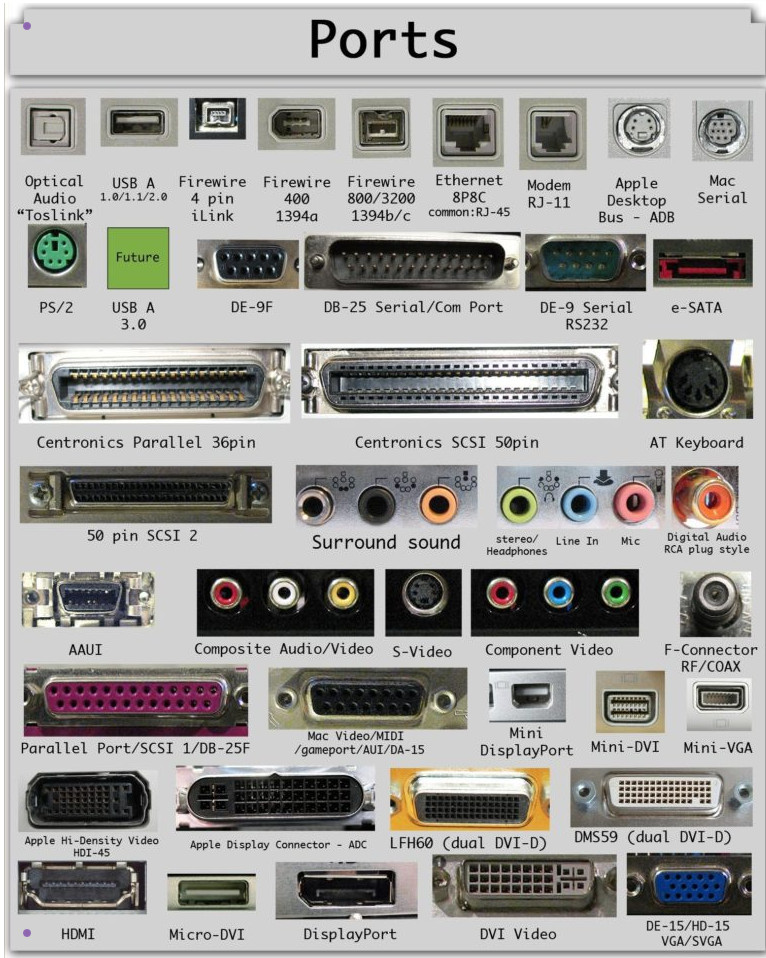
LIST OF PORTS ON MEDICAL DEVICE

They are essential for connectivity, data transfer, and various functionalities. Here's a breakdown of common ports you might find on medical devices:

1. DATA TRANSFER AND COMMUNICATION

  • USB (Universal Serial Bus): Extremely common for connecting to computers, peripherals, and charging. It comes in various types (USB-A, USB-B, USB-C, Mini-USB, Micro-USB), each with different shapes and capabilities.
  • RS-232 (Serial Port): An older standard, still used for some devices for simple data communication.
  • Ethernet: For networking and connecting to hospital information systems (HIS) or local networks.

2. DISPLAY AND OUTPUT

  • VGA (Video Graphics Array): An older standard for connecting to external displays (monitors).
  • DVI (Digital Visual Interface): A digital video interface for higher-quality display connections.
  • HDMI (High-Definition Multimedia Interface): A modern standard for transmitting high-definition video and audio.
  • DisplayPort: Another digital display interface, often found on newer devices.

3. AUDIO

  • 3.5mm Headphone Jack: The standard audio jack for headphones or speakers.

4. SPECIALIZED MEDICAL PORTS

  • ECG/EKG Ports: For connecting electrocardiogram leads to monitor heart activity.
  • SpO2 Ports: For connecting pulse oximeter sensors to measure blood oxygen levels.
  • Blood Pressure Ports: For connecting blood pressure cuffs.
  • Temperature Probe Ports: For connecting temperature probes.

5. OTHER PORTS

  • Power Connectors: For supplying power to the device. These can vary widely in shape and size.
  • DC Power Jack: A common type of power connector.

Wireless Interfaces

Many devices now replace or supplement physical ports with built-in radios. These do not appear as sockets on the casing, but they are connection points all the same:

  • Bluetooth and Bluetooth Low Energy (BLE): short-range links used by wearables, glucose monitors, blood pressure cuffs and pulse oximeters to send readings to a smartphone, tablet or hub.
  • Wi-Fi: connects bedside and portable devices to the facility network or a home router for data upload and remote monitoring.
  • Cellular (LTE, LTE-M, NB-IoT, 5G): used by remote patient monitoring kits and alert devices that must work where no Wi-Fi is available, often through a built-in modem or a separate gateway.
  • NFC: very short-range communication used for pairing, configuration or reading data from sensors held close to a reader.

Gas, Fluid and Sensor Connections

Some of the most important "ports" on medical equipment carry gases or fluids rather than data:

  • Medical gas inlets and outlets: ventilators, anesthesia machines and oxygen equipment connect to wall outlets or cylinders through gas-specific connectors designed so that one gas cannot be plugged into another's supply.
  • Small-bore connectors: IV lines, feeding tubes and neuraxial (spinal) lines connect through standardized small-bore connectors. The ISO 80369 series defines distinct designs for different uses, such as Luer connectors for intravascular lines and ENFit connectors for enteral feeding, to help prevent dangerous misconnections.
  • Probe and transducer sockets: ultrasound transducers, invasive pressure lines and other sensors often use manufacturer-specific connectors. Always use accessories listed as compatible in the device's instructions for use.

WHY ARE THESE PORTS IMPORTANT?

  • Data Transfer: To transfer data between the medical device and a computer, another device, or a network. This is crucial for storing patient information, analyzing data, and updating software.
  • Connectivity: To connect to external devices like monitors, printers, or other medical equipment.
  • Charging: To charge the device's battery.
  • Communication: To allow the device to communicate with other systems or devices.

Network Ports Used to Reach Hospital Systems and the Cloud

The word "port" also has a second meaning. Besides the physical socket, networked devices communicate through numbered software ports that identify the type of traffic. Knowing which ones a device uses helps IT teams configure firewalls correctly:

Port (TCP)Typical use
443HTTPS: encrypted web and API traffic, the most common route from devices to cloud platforms
80HTTP: unencrypted web traffic; it should not carry patient data and is often used only to redirect to HTTPS
8883MQTT over TLS: a lightweight messaging protocol widely used by IoT devices and gateways
104 and 11112DICOM: transfer of medical images between modalities, PACS and workstations
2575HL7 v2 over MLLP: exchange of clinical messages such as results and admissions with hospital information systems
49152 to 65535Dynamic (ephemeral) ports chosen automatically for the device's side of an outgoing connection

Exact ports vary by product and configuration, so confirm them in the manufacturer's network documentation. As a rule, a device that connects to the cloud only needs outbound connections; inbound ports should stay closed unless there is a documented reason to open them.

Security Considerations for Device Ports

Every port, physical or network, is a possible entry point. Practical steps for healthcare facilities and manufacturers include:

  • Disable what is not needed: close unused network services and, where the design allows, disable or physically block unused USB and service ports.
  • Control physical access: service and debug ports should require authentication and be accessible only to authorized technicians.
  • Treat removable media with care: USB drives can introduce malware; use approved, scanned media for software updates and data export.
  • Segment the network: place medical devices on their own network segment with firewall rules that allow only the connections each device needs.
  • Ask for documentation: the Manufacturer Disclosure Statement for Medical Device Security (MDS2) form lists a device's security features, including its network ports and services, and is a useful document to request before purchase.

When looking at medical devices, understanding the types of ports they have can give you valuable insights into their capabilities, connectivity options, and potential for integration with other systems.