Description
OTOSCOPE VIDEO SY-G046-2 WITH AI
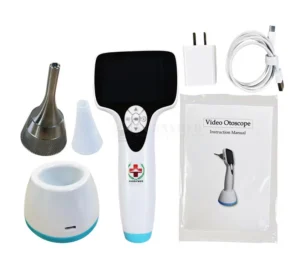
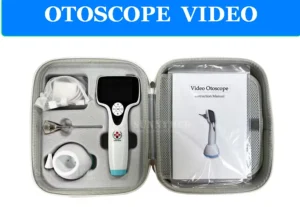
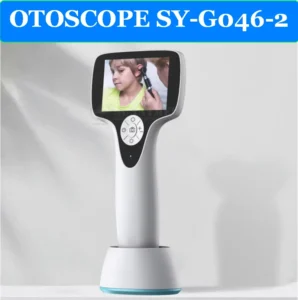
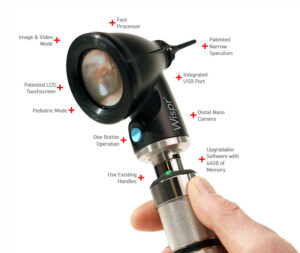
The SY-G046-2 VIDEO OTOSCOPE is a state-of-the-art diagnostic tool specifically designed for veterinary use. With its high-resolution display and intuitive features, it provides a clear, real-time image of the ear canal and eardrum, making it ideal for human beings and with different scopes animal examinations. This versatile otoscope is ideal for use in clinics and hospitals, providing precise visualizations during examinations and treatments.
MAIN FEATURES:
- 3-inch LCD Screen: Clear, high-quality imaging on a 3-inch LCD screen for easy viewing of the ear canal and eardrum.
- High Resolution: Equipped with 1280*720 resolution , providing clear and detailed images for accurate diagnosis.
- Application: Ideal for use in ENT surgical units and routine animal ear health examinations.
- Compact and Portable: Lightweight design for easy use and portability in various veterinary environments.
- Durable and reliable: Designed to withstand the demands of veterinary practices, ensuring long-lasting performance.
ADDITIONAL BENEFITS:
- High-quality imaging: Provides real-time video for effective diagnosis and treatment of ear conditions in humans or animals.
- Targeted keyword: Specially designed for ENT medical equipment needs .
Features:
- Product Name: VIDEO OTOSCOPE
- Model Number: SY-G046-2
- Display: 3 inch LCD
- Resolution: 1280*720
- Use: ENT surgery unit
Video Otoscope is an essential tool for any veterinary clinic or hospital. It provides a reliable and efficient way to examine animal ears. With its high-resolution imaging and portable design, it offers convenience and accuracy for diagnosing ear conditions in various animal species
Your SY-G046-2 otoscope is a digital video otoscope with features that make it suitable for integration with cloud-based AI analysis platforms. According to the specifications I found, it has the following capabilities:
- 3-inch LCD display
- 640×480 resolution
- USB connectivity
- Photo and video recording capability
- Weight of approximately 280g
AVAILABLE CLOUD AI PLATFORMS FOR EAR IMAGE ANALYSIS
There are several cloud-based AI platforms that can analyze otoscope images for diagnostic purposes. Here are the most relevant options:
1. HEARSCOPE AI PLATFORM
The HearScope system offers a cloud-based AI solution specifically designed for ear image analysis. While it was originally designed to work with their own otoscope hardware, their platform can potentially work with images from other digital otoscopes like your SY-G046-2.
KEY FEATURES:
- CLOUD-BASED AI CLASSIFICATION SYSTEM
- CLASSIFIES IMAGES INTO CATEGORIES: NORMAL, WAX OBSTRUCTION, CHRONIC PERFORATIONS, AND ABNORMAL
- PROVIDES CONFIDENCE RATINGS FOR DIAGNOSES
- REPORTED ACCURACY OF UP TO 94% IN DIAGNOSTIC CATEGORIES
- REQUIRES INTERNET CONNECTION TO RETURN A DIAGNOSIS BUT CAN SAVE IMAGES LOCALLY FOR LATER UPLOADING
2. GOOGLE CLOUD VISION AI
Google Cloud offers powerful image analysis capabilities that can be trained to work with medical images including otoscope imagery.
KEY FEATURES:
- GENERAL-PURPOSE IMAGE RECOGNITION PLATFORM THAT CAN BE CUSTOMIZED
- REQUIRES CUSTOM MODEL TRAINING FOR SPECIFIC EAR DIAGNOSES
- SCALABLE CLOUD INFRASTRUCTURE
- INTEGRATION THROUGH APIS
- HIPAA-COMPLIANT OPTIONS AVAILABLE
3. REMMIE.AI PLATFORM
Remmie offers an AI-powered platform specifically designed for ear, nose, and throat examinations.
KEY FEATURES:
- AI-GUIDED SYMPTOM ANALYSIS
- REMOTE VIDEO STREAMING CAPABILITIES
- CAN WORK WITH COMPATIBLE DIGITAL OTOSCOPES
- FDA-REGISTERED PLATFORM
STEPS TO INTEGRATE YOUR SY-G046-2 WITH CLOUD AI PLATFORMS
1. CONNECT YOUR OTOSCOPE TO A COMPUTER
Your SY-G046-2 has USB connectivity, which allows you to connect it to a computer. This is the first step in the process:
1. Install any required drivers for your SY-G046-2 device
2. Connect the otoscope to your computer via USB
3. Use the device’s built-in software or a compatible application to capture images/videos
2. IMAGE CAPTURE AND MANAGEMENT
For AI analysis, you’ll need to capture high-quality images of the ear canal and eardrum:
1. Ensure proper lighting (your device has adjustable LED lights)
2. Capture clear, focused images of the eardrum
3. Save images in common formats (JPEG, PNG) that can be uploaded to cloud platforms
3. CLOUD AI PLATFORM INTEGRATION OPTIONS
Option A: Use Existing Web Interfaces
1. Sign up for one of the AI platforms mentioned above (HearScope, Google Cloud Vision AI, or Remmie.ai)
2. Upload your captured ear images through their web interface
3. Receive AI-powered analysis and diagnostic assistance
Option B: API Integration for Custom Workflow
For a more seamless experience, you might consider API integration:
1. Sign up for developer access to the AI platform of your choice
2. Follow their API documentation to create a custom integration
3. Develop a workflow that automatically uploads images from your otoscope to the AI platform
4. Display results in a custom interface
4. DATA SECURITY AND COMPLIANCE
When working with medical images and patient data, ensure:
1. HIPAA compliance for patient data protection
2. Secure transmission protocols (HTTPS) for data transfer
3. Patient consent for AI-powered analysis
4. Proper data storage and retention policies
Recommended Approach for Your SY-G046-2
Based on your specific otoscope model and the available platforms, here’s a recommended approach:
1. Start with HearScope’s platform: They have a specialized AI specifically trained for ear image analysis with high reported accuracy.
2. CONSIDER A HYBRID WORKFLOW:
o Connect your SY-G046-2 to your computer
o Capture images using the device’s built-in capabilities
o Upload selected images to the HearScope AI platform for analysis
o Review the AI-assisted diagnosis alongside your clinical assessment
OTOSCOPE VIDEO SY-G046-2 WITH AI
The SY-G046-2 VIDEO OTOSCOPE is a state-of-the-art diagnostic tool specifically designed for veterinary use. With its high-resolution display and intuitive features, it provides a clear, real-time image of the ear canal and eardrum, making it ideal for human beings and with different scopes animal examinations. This versatile otoscope is ideal for use in clinics and hospitals, providing precise visualizations during examinations and treatments.
MAIN FEATURES:
- 3-inch LCD Screen: Clear, high-quality imaging on a 3-inch LCD screen for easy viewing of the ear canal and eardrum.
- High Resolution: Equipped with 1280*720 resolution , providing clear and detailed images for accurate diagnosis.
- Application: Ideal for use in ENT surgical units and routine animal ear health examinations.
- Compact and Portable: Lightweight design for easy use and portability in various veterinary environments.
- Durable and reliable: Designed to withstand the demands of veterinary practices, ensuring long-lasting performance.
ADDITIONAL BENEFITS:
- High-quality imaging: Provides real-time video for effective diagnosis and treatment of ear conditions in humans or animals.
- Targeted keyword: Specially designed for ENT medical equipment needs .
Features:
- Product Name: VIDEO OTOSCOPE
- Model Number: SY-G046-2
- Display: 3 inch LCD
- Resolution: 1280*720
- Use: ENT surgery unit
Video Otoscope is an essential tool for any veterinary clinic or hospital. It provides a reliable and efficient way to examine animal ears. With its high-resolution imaging and portable design, it offers convenience and accuracy for diagnosing ear conditions in various animal species
Your SY-G046-2 otoscope is a digital video otoscope with features that make it suitable for integration with cloud-based AI analysis platforms. According to the specifications I found, it has the following capabilities:
- 3-inch LCD display
- 640×480 resolution
- USB connectivity
- Photo and video recording capability
- Weight of approximately 280g
AVAILABLE CLOUD AI PLATFORMS FOR EAR IMAGE ANALYSIS
There are several cloud-based AI platforms that can analyze otoscope images for diagnostic purposes. Here are the most relevant options:
1. HEARSCOPE AI PLATFORM
The HearScope system offers a cloud-based AI solution specifically designed for ear image analysis. While it was originally designed to work with their own otoscope hardware, their platform can potentially work with images from other digital otoscopes like your SY-G046-2.
KEY FEATURES:
- CLOUD-BASED AI CLASSIFICATION SYSTEM
- CLASSIFIES IMAGES INTO CATEGORIES: NORMAL, WAX OBSTRUCTION, CHRONIC PERFORATIONS, AND ABNORMAL
- PROVIDES CONFIDENCE RATINGS FOR DIAGNOSES
- REPORTED ACCURACY OF UP TO 94% IN DIAGNOSTIC CATEGORIES
- REQUIRES INTERNET CONNECTION TO RETURN A DIAGNOSIS BUT CAN SAVE IMAGES LOCALLY FOR LATER UPLOADING
2. GOOGLE CLOUD VISION AI
Google Cloud offers powerful image analysis capabilities that can be trained to work with medical images including otoscope imagery.
KEY FEATURES:
- GENERAL-PURPOSE IMAGE RECOGNITION PLATFORM THAT CAN BE CUSTOMIZED
- REQUIRES CUSTOM MODEL TRAINING FOR SPECIFIC EAR DIAGNOSES
- SCALABLE CLOUD INFRASTRUCTURE
- INTEGRATION THROUGH APIS
- HIPAA-COMPLIANT OPTIONS AVAILABLE
3. REMMIE.AI PLATFORM
Remmie offers an AI-powered platform specifically designed for ear, nose, and throat examinations.
KEY FEATURES:
- AI-GUIDED SYMPTOM ANALYSIS
- REMOTE VIDEO STREAMING CAPABILITIES
- CAN WORK WITH COMPATIBLE DIGITAL OTOSCOPES
- FDA-REGISTERED PLATFORM
STEPS TO INTEGRATE YOUR SY-G046-2 WITH CLOUD AI PLATFORMS
1. CONNECT YOUR OTOSCOPE TO A COMPUTER
Your SY-G046-2 has USB connectivity, which allows you to connect it to a computer. This is the first step in the process:
1. Install any required drivers for your SY-G046-2 device
2. Connect the otoscope to your computer via USB
3. Use the device’s built-in software or a compatible application to capture images/videos
2. IMAGE CAPTURE AND MANAGEMENT
For AI analysis, you’ll need to capture high-quality images of the ear canal and eardrum:
1. Ensure proper lighting (your device has adjustable LED lights)
2. Capture clear, focused images of the eardrum
3. Save images in common formats (JPEG, PNG) that can be uploaded to cloud platforms
3. CLOUD AI PLATFORM INTEGRATION OPTIONS
Option A: Use Existing Web Interfaces
1. Sign up for one of the AI platforms mentioned above (HearScope, Google Cloud Vision AI, or Remmie.ai)
2. Upload your captured ear images through their web interface
3. Receive AI-powered analysis and diagnostic assistance
Option B: API Integration for Custom Workflow
For a more seamless experience, you might consider API integration:
1. Sign up for developer access to the AI platform of your choice
2. Follow their API documentation to create a custom integration
3. Develop a workflow that automatically uploads images from your otoscope to the AI platform
4. Display results in a custom interface
4. DATA SECURITY AND COMPLIANCE
When working with medical images and patient data, ensure:
1. HIPAA compliance for patient data protection
2. Secure transmission protocols (HTTPS) for data transfer
3. Patient consent for AI-powered analysis
4. Proper data storage and retention policies
Recommended Approach for Your SY-G046-2
Based on your specific otoscope model and the available platforms, here’s a recommended approach:
1. Start with HearScope’s platform: They have a specialized AI specifically trained for ear image analysis with high reported accuracy.
2. CONSIDER A HYBRID WORKFLOW:
o Connect your SY-G046-2 to your computer
o Capture images using the device’s built-in capabilities
o Upload selected images to the HearScope AI platform for analysis
o Review the AI-assisted diagnosis alongside your clinical assessment